
油猴脚本尝试
0.
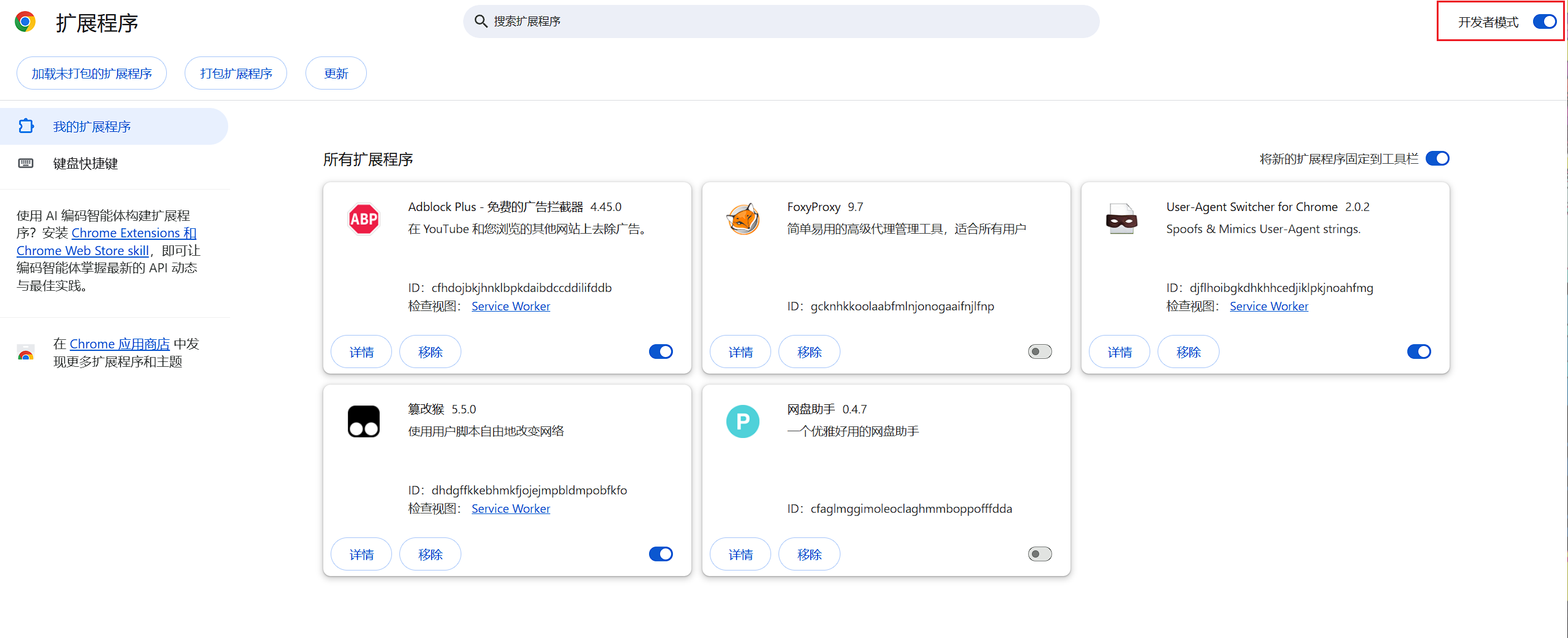
首先需要打开开发者模式,然后点进油猴脚本插件的详情页面,将允许运行用户脚本和允许访问文件网址勾选上.
1. 基础
1.1 脚本管理器
Tampermonkey
目前主流,多浏览器支持。-
这就是平时说的“油猴”,但没有多浏览器支持,并且与其他脚本管理器的API不兼容。
-
暴力猴,没深入用过,但界面更简洁美观。
1.2 元数据
开头注释行的内容,这里讲几个:
@match指定生效网站。@grant声明GM API,每个API在使用前都应该在元数据中声明。@run-a指定脚本在网页加载的哪个阶段开始注入并执行,通常有以下几个值:- document-start HTML 文档刚开始加载、DOM 节点和外部资源(CSS/JS)都未生成时。
- document-body
<body>节点出现时。 - document-end DOM 结构加载完毕,默认选项。
- document-idle 浏览器空闲时。
- context-menu 右键菜单触发。
@require引入外部库或js脚本,也可以引用本地的。
2. QQ空间自动删除说说脚本
练手用的,本来想写个学习通刷课的,但是我刷完了,,,
// ==UserScript==
// @name         QQ空间一键删除说说
// @namespace    http://tampermonkey.net/
// @version      1.0
// @description  自动批量删除说说
// @author       Venus
// @match        *://user.qzone.qq.com/*
// @match        *://*.qzone.qq.com/*
// @icon         data:image/gif;base64,R0lGODlhAQABAAAAACH5BAEKAAEALAAAAAABAAEAAAICTAEAOw==
// @grant        none
// @run-at       document-end
// ==/UserScript==
(function () {
    'use strict';

    let isRunning = false;
    const sleep = (ms) => new Promise(resolve => setTimeout(resolve, ms));

    function getCanvasDocument() {
        const iframe = document.getElementById('app_canvas_frame') || document.querySelector('iframe');
        return iframe ? (iframe.contentDocument || iframe.contentWindow.document) : document;
    }

    async function startAutoDelete() {
        console.log("QQ空间说说删除脚本已启动");

        while (isRunning) {
            const doc = getCanvasDocument();
            const delBtns = doc.querySelectorAll('.del_btn');

            if (delBtns.length > 0) {
                console.log(`找到 ${delBtns.length} 条说说,准备删除...`);
                delBtns[0].click();
                await sleep(1000);

                if (!isRunning) break;

                const confirmBtn = document.querySelector('.qz_dialog_layer_btn, .qz_dialog_layer_sub');
                if (confirmBtn) {
                    confirmBtn.click();
                    console.log("已确认删除");
                    await sleep(2500);
                } else {
                    console.warn("未找到确认按钮");
                    await sleep(1000);
                }
            } else {
                console.log("当前页面暂无可删除说说,尝试翻页...");
                const nextBtn = doc.querySelector('.pager_next_0, .page_next');
                if (nextBtn && nextBtn.offsetHeight > 0) {
                    nextBtn.click();
                    console.log("已翻页,等待页面加载...");
                    await sleep(4000);
                } else {
                    console.log("暂未找到更多说说或下一页,删除任务结束");
                    alert("QQ空间说说已全部清理完毕或无法继续翻页!");
                    toggleScript(false);
                    break;
                }
            }
        }
    }

    function createControlBtn() {
        if (document.getElementById('qzone-del-btn')) return;

        const btn = document.createElement('button');
        btn.id = 'qzone-del-btn';
        btn.innerHTML = `
            <span style="font-size: 16px; margin-right: 6px;">🚀</span>
            <span>开始自动删除</span>
        `;

        btn.style.cssText = `
            position: fixed;
            top: 120px;
            right: 24px;
            z-index: 999999;
            display: flex;
            align-items: center;
            justify-content: center;
            padding: 10px 20px;
            background: linear-gradient(135deg, #ff4d4f 0%, #ff7875 100%);
            color: #ffffff;
            border: none;
            border-radius: 50px;
            font-size: 14px;
            font-weight: 600;
            letter-spacing: 0.5px;
            cursor: pointer;
            box-shadow: 0 4px 15px rgba(255, 77, 79, 0.35);
            transition: all 0.3s cubic-bezier(0.4, 0, 0.2, 1);
            user-select: none;
            backdrop-filter: blur(4px);
            outline: none;
        `;

        btn.onmouseenter = () => {
            if (!isRunning) {
                btn.style.transform = 'translateY(-2px) scale(1.03)';
                btn.style.boxShadow = '0 6px 20px rgba(255, 77, 79, 0.45)';
            } else {
                btn.style.transform = 'translateY(-2px) scale(1.03)';
                btn.style.boxShadow = '0 6px 20px rgba(24, 144, 255, 0.45)';
            }
        };

        btn.onmouseleave = () => {
            btn.style.transform = 'translateY(0) scale(1)';
            if (!isRunning) {
                btn.style.boxShadow = '0 4px 15px rgba(255, 77, 79, 0.35)';
            } else {
                btn.style.boxShadow = '0 4px 15px rgba(24, 144, 255, 0.35)';
            }
        };

        btn.onmousedown = () => {
            btn.style.transform = 'translateY(1px) scale(0.97)';
        };

        btn.onclick = () => {
            toggleScript(!isRunning);
        };

        document.body.appendChild(btn);
    }

    function toggleScript(status) {
        isRunning = status;
        const btn = document.getElementById('qzone-del-btn');
        if (!btn) return;

        if (isRunning) {
            btn.innerHTML = `
                <span style="font-size: 16px; margin-right: 6px; display: inline-block; animation: spin 2s linear infinite;">⏳</span>
                <span>停止删除中...</span>
            `;
            btn.style.background = 'linear-gradient(135deg, #1890ff 0%, #36cfc9 100%)';
            btn.style.boxShadow = '0 4px 15px rgba(24, 144, 255, 0.35)';

            if (!document.getElementById('qzone-btn-style')) {
                const style = document.createElement('style');
                style.id = 'qzone-btn-style';
                style.innerHTML = `@keyframes spin { 0% { transform: rotate(0deg); } 100% { transform: rotate(360deg); } }`;
                document.head.appendChild(style);
            }

            startAutoDelete();
        } else {
            btn.innerHTML = `
                <span style="font-size: 16px; margin-right: 6px;">🚀</span>
                <span>开始自动删除</span>
            `;
            btn.style.background = 'linear-gradient(135deg, #ff4d4f 0%, #ff7875 100%)';
            btn.style.boxShadow = '0 4px 15px rgba(255, 77, 79, 0.35)';
            console.log("=== 脚本已被用户手动停止 ===");
        }
    }

    window.addEventListener('load', () => {
        setTimeout(createControlBtn, 2000);
    });
})();
你也可以把油猴脚本自带的格式去掉,直接在浏览器控制台使用。
▲
▼